Most engineering teams share the same quiet problem. The code is well tested, the deploys are smooth, and the documentation describes a version of the system that no longer exists.
AI can close part of that gap. Given the right context, a model can read a codebase and produce a solid first draft of a README, an API reference, or a runbook in minutes. What it cannot do is guarantee that the draft is true. This post lays out a workflow that treats AI as a fast drafter and a human as the final authority, and it explains why developers are increasingly choosing tools that put documentation earlier in the process.
Why does documentation drift away from the code?
Documentation drifts because it is written once and maintained never. It gets produced at the end of a feature, when attention has already moved on, and from that point the code changes daily while the document changes rarely.
The State of Docs 2026 survey of 1,131 professionals, as summarized by Docsio, found that keeping docs in sync with the product is the biggest challenge teams face, nearly double the next one. That tells us the core issue is upkeep, not authorship. Any solution that only helps you write the first version faster is solving the smaller half of the problem.
The cost of drift is easy to underestimate. A stale setup guide does not just waste ten minutes. It teaches readers that the docs cannot be trusted, and after that they stop reading them.
What can AI actually do with a codebase?
AI is strongest at extraction and drafting. It can enumerate routes and handlers, summarize modules, describe function signatures, list the configuration a service expects, and arrange all of it under sensible headings. It can also explain dense logic in plain language, which is often the part humans avoid.
Its limits are just as clear. A model sees what the code does, not why it does it. It does not know which behavior is intentional, which was a temporary fix that became permanent, or what changed since the last release unless you supply that history.
Trust data reflects this split. Stack Overflow's 2026 Developer Survey, as reported by IT Brief, found that nearly half of respondents trust AI output when they can verify it easily, while only 6.6% would trust it for important decisions. The practical takeaway is that a good workflow is built around easy verification.
How do you set up a documentation task for AI?
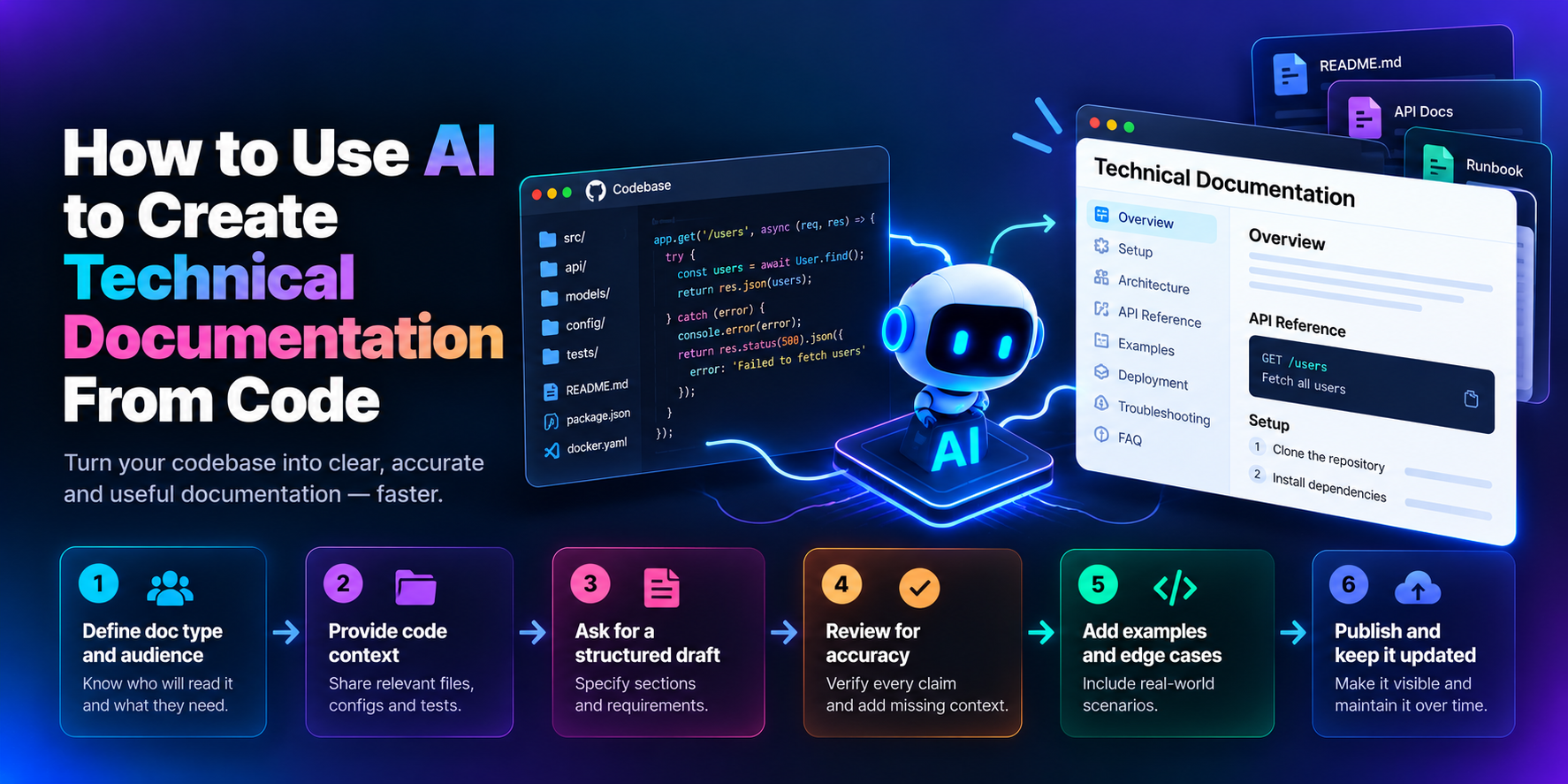
Start by deciding what kind of document you want and who will read it. A README, an API reference, an architecture overview, a runbook, an onboarding guide, and a changelog all have different readers and different success criteria.
Write the brief in one or two sentences before you touch a prompt:
Audience: new backend engineer
Doc type: onboarding guide
Goal: working local environment in under 30 minutes
That brief becomes your review standard later. If the finished doc does not get a new engineer to a running environment, it is not done, no matter how polished it reads.
What context should you give the model?
Give it the material that explains behavior. That means the relevant source files, configuration, tests, and any existing README or changelog. Tests are especially valuable because they encode intended behavior, which is exactly what a model cannot infer from implementation alone.
Keep out anything sensitive or noisy: secrets, credentials, large irrelevant files, and generated or vendored code. The cleaner the input, the more accurate the draft.
A reusable prompt skeleton looks like this:
Based on the following code, generate a [doc type] for [audience].
Focus on [goal]. Include these sections: [sections].
Use only examples that appear in the provided files.
Keep it accurate and concise, and mark anything you are unsure about.
The last two lines do real work. Restricting examples to what is in the repo reduces invented snippets, and asking for uncertainty flags gives you a ready-made review list.
How do you get a draft you can actually review?
Ask for structure, not "documentation." A vague request produces vague prose. A specific one produces something you can check section by section.
For a README, request an overview, setup steps, usage, an API reference, and a troubleshooting section, with code examples drawn from the repository. For a runbook, request trigger conditions, diagnosis steps, remediation commands, and escalation paths.
A consistent structure pays off twice. The first draft arrives faster, and the review is easier, because you always know where each claim lives.
How should you review AI-written documentation?
Review it the way you would review a pull request from a capable but new teammate. Assume good intent and verify everything.
Run the setup instructions on a clean environment. Execute every code example. Compare parameter names, defaults, and return types against the source. Look for references to flags, files, or endpoints that no longer exist. Then do a read-through as the target reader and ask whether they could finish the task without asking anyone for help.
Be most careful with polished drafts. A clean, confident document creates a feeling of completeness that discourages checking, and that is exactly when errors slip through.
What does the AI miss that you need to add?
After verification, add the layer only your team has. That includes real-world usage examples, edge cases, error-handling behavior, configuration trade-offs, and known limitations.
The most valuable addition is usually the reasoning behind a decision. A short note explaining that writes are batched because the upstream service rate-limits requests will save the next engineer more time than a page of generic description. This step is also what lowers support load, because it answers the questions people would otherwise ask in chat.
How do you keep documentation current?
Treat documentation as a living part of the repository. Publish it in one central place, link to it from the README, and set a review cadence. Tie updates to meaningful changes so that a significant code change prompts a doc change.
Where you can, put "docs updated" into your definition of done, and track which pages have not been touched in a long time. A lightweight stale-doc list beats an ambitious documentation overhaul that nobody maintains.
Why are developers choosing tools that generate docs during the build?
The shift comes down to effort and trust.
Writing docs after the fact is reverse-engineering your own work when you would rather move on. Reviewing a draft is easier on the mind than starting from a blank page, which is a large part of why AI drafting spread so quickly. At the same time, developers want to inspect where an output came from before they rely on it.
Those two pressures push tooling toward generating written artifacts early and keeping them reviewable. Some developers get there with repo-aware coding assistants and project instruction files. Others adopt platforms that restructure the build itself. 8080.ai is one example, a multi-agent coding platform whose process begins with a written requirements document, with each later change presented as a diff to accept or reject, and with architecture diagrams drawn before code, as described on its site. The 8080.ai public gallery also lets visitors open a project and read its requirements, designs, and task board, which shows what documentation-first output looks like in practice.
None of this removes the need for human review. It changes where the review happens: earlier, on a smaller artifact, with a clearer record of what was decided.
What mistakes should you avoid?
Blind trust is the most common. Fluent text is not accurate text, so verify before you publish.
Thin context is next. If you give a model one file, you will get generic output. Provide configuration, tests, and existing docs.
Skipping maintenance is the quiet one. Without a cadence, even a great first draft turns into a liability within a quarter.
Finally, avoid handing over judgment. AI can draft, but deciding what matters, what to omit, and what is safe to state publicly remains an engineering decision.
What is the division of labor between AI and the engineer?
AI extracts structure, drafts content, proposes examples, and explains logic in plain language. The engineer validates the structure, checks every claim, runs every example, confirms intent, and owns updates over time.
If you remember one thing, make it this: AI speeds up the draft, and a person owns the truth. Start with a single document, such as an onboarding guide, and run it through the full loop once. You will learn quickly where AI saves you time and where your own judgment is irreplaceable.
Comments
Join the discussionNo comments yet. Be the first to comment.