The Real Checklist for Turning an MCP Server Into a Production Service
A practical checklist for making an MCP server production-ready, authentication, least privilege, input validation, audit trails, and testing
A working MCP server and a production-ready one are not the same artifact, even though they can look identical in a demo. The difference shows up the first time a real user hits it with a malformed request, an unauthorized token, or a document containing an instruction it was never supposed to follow.
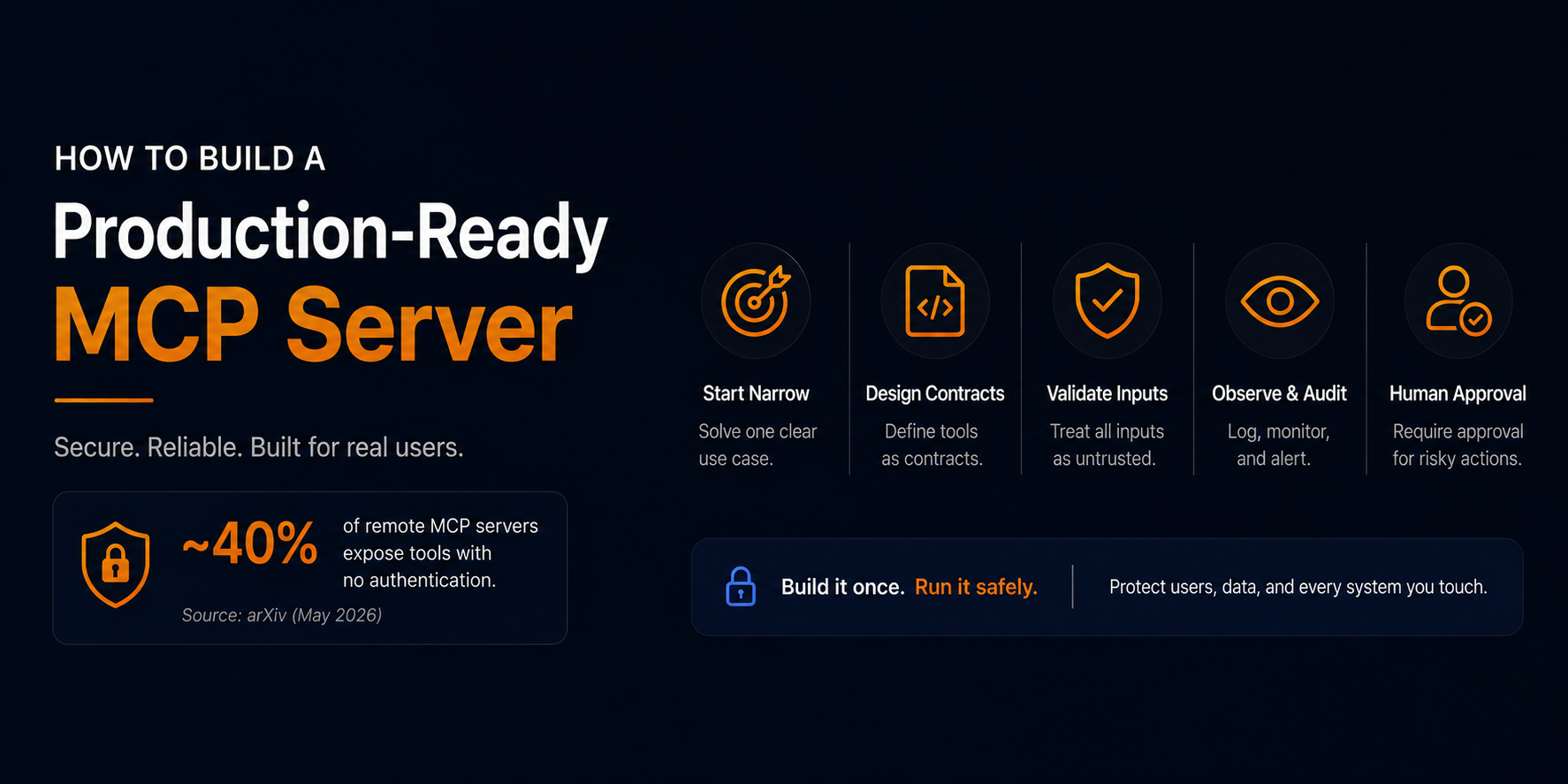
That gap is bigger than most teams assume. A recent measurement study examined nearly 8,000 remote MCP servers and found that roughly 40% exposed tool interfaces with no authentication whatsoever, any client could invoke a tool without presenting credentials of any kind (arXiv, "A First Measurement Study on Authentication Security in Real-World Remote MCP Servers"). At least one of the exposed servers in that study was an internal CRM, quietly reachable by anyone, holding more than 5,000 customer records.
This piece is a working checklist for closing that gap, not an introduction to what MCP is.
What does "production-ready" mean for an MCP server?
Protocol compatibility, the server responds correctly, the tool appears in a client, the message format is valid is table stakes, not the finish line. A production-ready server also has to protect users, credentials, and every downstream system it touches; behave predictably when inputs are malformed or dependencies fail; and carry the operational basics of any real service: ownership, versioning, monitoring, and an incident response path.
OWASP's dedicated MCP security guidance and the official MCP authorization docs converge on the same baseline: enforce HTTPS, use OAuth-based authorization, apply least-privilege scopes, treat every tool argument as untrusted, validate tool output before it re-enters model context, and never expose a raw shell or an unrestricted URL fetcher as a tool (OWASP MCP Security Cheat Sheet; MCP authorization tutorial).
Scope the server to one narrow workflow
Build one workflow with clear, defined value rather than a general-purpose server that "can do anything." Favor read-only operations where feasible. Define the user, the data source, and the expected outcome up front, keep the initial tool set small, and document explicitly what the server will not do.
Reasonable first tools: searching approved internal documentation, looking up a customer's own account, reading deployment status, fetching a user's own support tickets. Tools to avoid on principle: arbitrary shell execution, unrestricted SQL access, unrestricted URL fetching, or unscoped resource deletion regardless of how much more "flexible" they'd make the server.
Specify every tool as a contract
Every tool is an API contract between an unpredictable caller and a deterministic system. Each one needs: an action-oriented name, a precise description of when it should and should not be used, required and optional inputs with strict validation, an expected output structure, documented error codes, side effects, a risk level, required permissions, retry-safety, and whether it needs human approval.
{
  "name": "get_deployment_status",
  "description": "Returns the status of a deployment for an approved project. Use this only to read deployment status. Do not use it to start, cancel, or roll back a deployment.",
  "input_schema": {
    "type": "object",
    "additionalProperties": false,
    "required": ["project_id", "deployment_id"],
    "properties": {
      "project_id": { "type": "string", "description": "The project identifier the authenticated user can access." },
      "deployment_id": { "type": "string", "description": "The deployment identifier." }
    }
  }
}
Validate every input as if it were adversarial
Model output is not trusted input. A tool call can be shaped by bad context, an ambiguous instruction, an injected instruction hidden in a document, or plain model error, and the server has no reliable way to distinguish between them at the point of the call.
Validate every argument at the server boundary with a strict JSON Schema: enforce types, lengths, formats, enums, and ranges; reject unknown fields rather than ignoring them; validate resource identifiers against the authenticated user's actual permissions; reject malformed values instead of silently correcting them; apply rate and payload limits; and sanitize everything before it reaches a database, shell, file path, or external API. Never pass model-generated text directly into a shell command, never allow arbitrary file paths, and never fetch a URL supplied by the model without an allowlist that blocks private, loopback, link-local, and cloud-metadata address ranges, a known path to SSRF against internal infrastructure.
Separate authentication from authorization
Authentication answers who is making the request. Authorization answers what that identity can do. Treating these as one step is a common production gap.
Authenticate every request. Enforce HTTPS. Prefer OAuth 2.1 for user-facing or multi-tenant servers, validating token signature, issuer, audience, expiry, and scopes, and favoring short-lived tokens. The server never the model decides which identity a request runs as, and a user's token should not be blindly forwarded to a downstream service. Authorization has to be checked per tool and per resource, not just once at connection time.
Apply least privilege per tool
Connecting an AI client to an MCP server shouldn't grant broad access to everything the server can reach. Separate read-only and write-capable tools. Scope permissions by tenant, project, environment, and data classification, with production access restricted more tightly than staging. Require explicit approval for high-impact actions, disable unused tools per user or workflow, and default network access to deny.
| Tool category | Example | Control |
|---|---|---|
| Read-only | search_docs, get_ticket |
Authenticated access, resource filtering |
| Reversible write | create_draft, create_preview_deployment |
Scoped access, audit log, retry protection |
| High-impact write | deploy_production, issue_refund |
Explicit approval, stronger scopes, full audit trail |
| Destructive | delete_user, drop_database |
Avoid exposing directly; route through a controlled workflow |
Design for prompt injection specifically
Traditional APIs don't have to defend against their own response content trying to redirect the next request. MCP servers do. A support ticket, document, or prior tool output can contain an instruction engineered to manipulate the model's next action.
Treat retrieved content as potentially adversarial. Never let content redefine tool permissions. Prefer structured arguments over free-form commands. Validate tool outputs before they re-enter the model's context, and never let one tool's output become another tool's command without that check. Test the server deliberately against adversarial documents before shipping.
Make writes safe, deliberate, and recoverable
Any tool that changes data or infrastructure needs to account for retries, partial failure, and human review from the start. Use idempotency keys for state-changing actions. Add dry-run or preview modes. Return an execution plan before performing high-impact actions and require explicit confirmation. Record whether an action completed, partially completed, or failed, and define a rollback or forward-fix path.
A single deploy_to_production(project_id) call is harder to review than a staged sequence: create a deployment plan, generate a preview deployment, run automated checks, request approval, then execute only the approved action. Separating planning from execution is what makes a high-impact action reviewable before it happens.
Return predictable responses and errors
MCP clients need stable, typed responses, not vague strings. State clearly whether an action occurred, whether retrying is safe, and what the next action should be — without leaking secrets, stack traces, or internal configuration.
{
  "status": "approval_required",
  "operation_id": "op_7f85",
  "action": "deploy_production",
  "approval_required": true,
  "reason": "Production deployments require release-manager approval.",
  "next_action": "request_approval",
  "retry_safe": true
}
Log what matters, never log secrets
A production MCP server needs to answer: who used which tool, with what scope, against which resource, and what happened. Log request and trace IDs, the authenticated principal, tool name and contract version, resource IDs, validation and authorization outcomes, approval events, response status, latency, and retry counts. Monitor tool-call volume, validation failures, authorization denials, timeouts, and unusual access patterns.
Never log authorization headers, access tokens, passwords, API keys, or full sensitive payloads without a defined reason and protection model — official MCP documentation is explicit on this point, and it's one of the simplest requirements to get right consistently.
Test past protocol compatibility
Test valid and invalid inputs, missing required fields, incorrect types, oversized payloads, unknown fields, invalid resource IDs, unauthorized and cross-tenant access attempts, expired tokens, duplicate write requests, dependency timeouts, partial failures, prompt-injection payloads, SSRF attempts, unsafe file paths, command injection attempts, tool-output injection, and approval-gate bypass attempts. Contract tests, schema tests, authentication and authorization tests, static analysis, dependency scans, and adversarial prompt tests belong in CI, not a pre-release checklist.
Operate it like a production service, because it is one
Containerize the service. Use managed secrets and environment-specific configuration. Enforce HTTPS. Add health and readiness checks. Apply rate limiting. Restrict network egress. Isolate development, staging, and production environments. Pin and scan dependencies. Maintain an incident-response runbook. Assign an owner to every tool, maintain a tool inventory and version registry, review permissions and logs on a schedule, and define a process for revoking compromised credentials.
The shift this reflects
This checklist isn't really specific to MCP. It's the same shift happening across AI-generated software more broadly, arriving at the tool-calling layer slightly later than everywhere else: the gap between "it works" and "it's safe to run against real data, indefinitely" doesn't close on its own, and closing it after launch is more expensive than designing toward it from the start.
That's part of why architecture-first thinking is showing up earlier in AI-assisted development pipelines in general not just at the MCP layer. Tools in this space, including 8080.ai, LangGraph, and CrewAI, are increasingly building a review step, a requirements document, a diff, an approval checkpoint into the pipeline before generated output reaches production, rather than treating review as an afterthought. 8080.ai's process, for example, produces a system requirements document and architecture diagrams before generating code, and routes later changes through an explicit diff-approval step rather than applying them automatically, the same "plan before execute" instinct this checklist describes, just applied one layer above the individual tool call.
Whether that checkpoint lives inside an MCP server's authorization layer or inside a broader AI development platform's build pipeline, the underlying requirement doesn't change: an automated system shouldn't act on a real system without a point where a human can see what it's about to do before it happens.
Checklist
Server solves one narrow, defined workflow
Every tool has a single clear purpose and an explicit "don't use this for" description
Inputs validated with strict schemas; unknown fields rejected
No raw shell, arbitrary file-path, or arbitrary URL tool exposed
HTTPS enforced; every request authenticated
Authorization checked per tool and per resource with least-privilege scopes
Write actions idempotent where possible; high-impact actions require approval
Secrets stay server-side and out of logs
Every action creates an audit record
Metrics, tracing, alerts, and health checks in place
Contract, integration, and security tests including prompt-injection and SSRF cases run in CI
Tools versioned with named owners
Rollback and incident procedures exist before launch